Google Business Profile Updates Spam Policy

Siobhan Park • August 9, 2022

Have you noticed a recent slew of Google Business Profile posts being removed recently? It’s most likely due to the recent update to their spam policies. Read on to learn how your photos, posts, video, and logos could be breaking their spam policy.

What is Google Business Profile’s Updated Spam Policy?

Google Business Profile’s content policy has become increasingly strict to prevent spam from misleading customers. The previous spam policy identified content as spam if it included: 


  • Misspellings
  • Gimmicky character use or gibberish
  • Images, videos, or links that distract the user
  • Links to irrelevant to the business
  • Poor image or video quality 
  • Phishing scams


But a new line item has been added, “Duplicate photos, posts, videos, and logos.” 
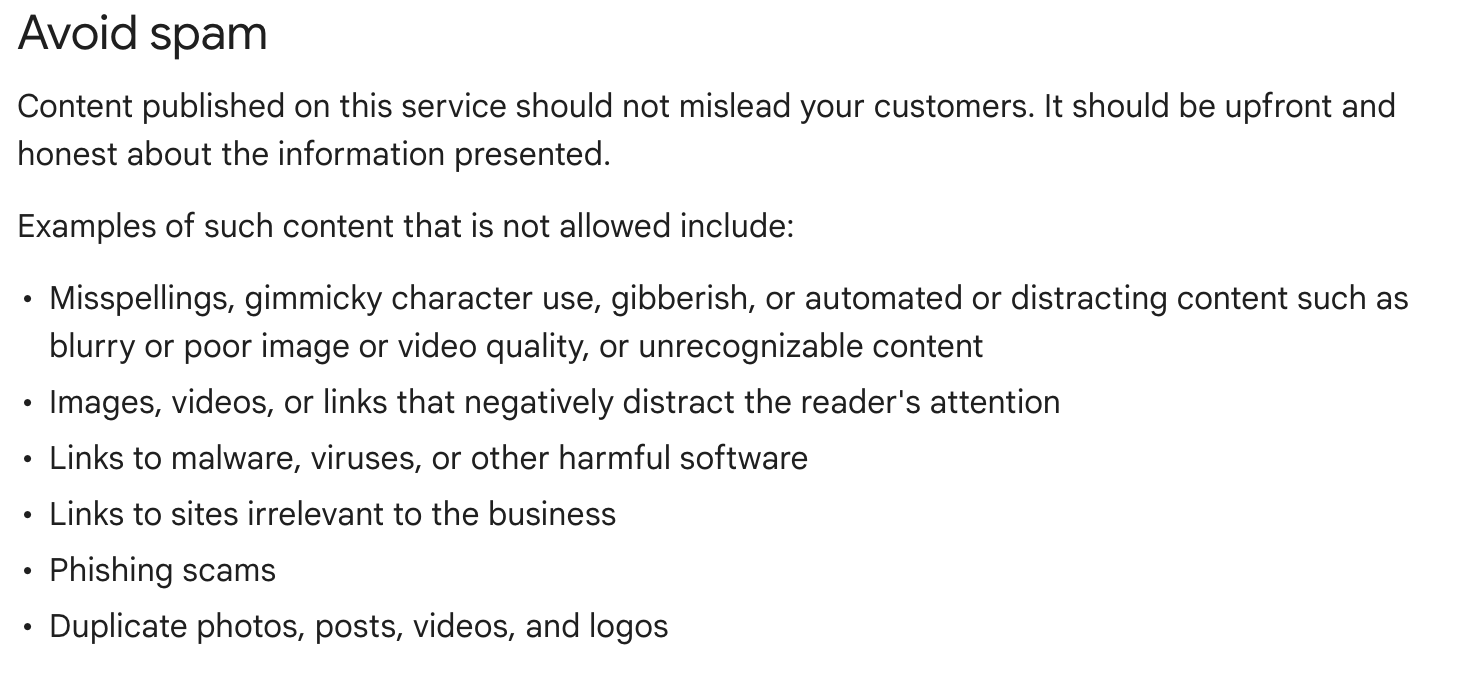
Google Business Profile Spam Policy

What’s the consequence for breaking their spam policy? 

If you’re caught using duplicate posts, videos, logos, or photos the post may be rejected or removed from Google Search and Google Maps. 

How is REPLI adapting to this updated policy?

Effective August 9th, 2022, REPLI will cease using photos in our GBP posts for 30 days. We will use this time to do the following: 


  • Conduct research on the impact of photos in post engagement and GBP performance
  • Create a process to allow our customers to easily submit new photos for the REPLI teams use in posting 


Our Customer Success team will be reaching out to our customers to discuss any concerns or answer questions. Like always, our SEO team is working hard to change our strategy to keep up with Google’s constantly evolving policies and algorithms. So just sit back and relax knowing our team is all over this and will be making the best adjustments to ensure your property is getting the most out of their Google Business Profile listing. 

Repli Apartment Marketing Blog

Subscribe to our Newsletter & Blogs

Blog Post Subscribe Form

We're committed to your privacy. Repli uses the information you provide to us to contact you about our relevant content, products, and services. You may unsubscribe from these communications at any time. For more information, check out our privacy policy.

Share Our Post!

Apartment Marketing Blog
By Francella Rojas June 10, 2026
Google now lets you link your Business Profile directly to GA4. Here's what the new integration means for local marketers and how to set it up the right way.
Black webinar slide with bold white text: “What Google’s AI Search Playbook Means For Your Property Website”
By Siobhan Park June 10, 2026
Google published its AI search guide—and the SEO world isn't buying all of it. Here's what multifamily marketers actually need to know to stay visible in AI search.
Purple marketing banner reading “The gold standard for GA4 analysis” with analytics dashboard screenshots and line chart
June 10, 2026
Knowing where your visitors come from is half the battle in multifamily marketing — and now MultiHub makes it crystal clear. Our latest MultiHub update brings a brand-new Traffic Acquisition view to your reporting, powered by GA4. 🎉 What's New? ✅ Source/Medium Breakdown – See every traffic source — direct, Google paid, organic search, social, and referrals — all in one clean view. ✅ Traffic Trends Over Time – A timeline chart shows how each source performs day to day, so you can spot what's working and when. ✅ At-a-Glance Comparison – A ranked bar chart instantly shows which channels are driving the most users to your site. ✅ Engagement Metrics That Matter – Sessions, engaged sessions, engagement rate, and events per session, all side by side for every source. How It Works. The new Traffic Acquisition section lives right in your MultiHub reporting. It pulls your GA4 data and organizes it so you can answer the questions that actually matter: Which channels send you the most visitors? Is your paid search outperforming organic — or the other way around? Which referral sites are sending engaged, high-quality traffic? How is your traffic trending week over week? No spreadsheets, no digging through GA4's menus — just the numbers you need, laid out and ready to read. Why You'll Love It. Marketing decisions are only as good as the data behind them. With the new Traffic Acquisition view, you'll know exactly which channels are pulling their weight and where to focus your next move — all without leaving MultiHub : smarter  reporting, better decisions, less guesswork.
Show More