The Ultimate Guide to Google Ad Campaigns for Apartment Communities
Google Ads can be a game-changer for apartment communities, but with so many options, how do you choose the right one? Whether you're filling vacancies fast, building brand awareness, or keeping your community top-of-mind, the right campaign can make all the difference. Google’s advertising platform offers a variety of campaign types, each tailored to different marketing goals.
But not all campaigns are created equal—some are better for driving immediate leads, while others help establish long-term brand recognition. In this guide, we’ll break down the different types of Google Ads that Repli loves and trusts the most, their strengths, and when you should use them to maximize your marketing budget and leasing success.
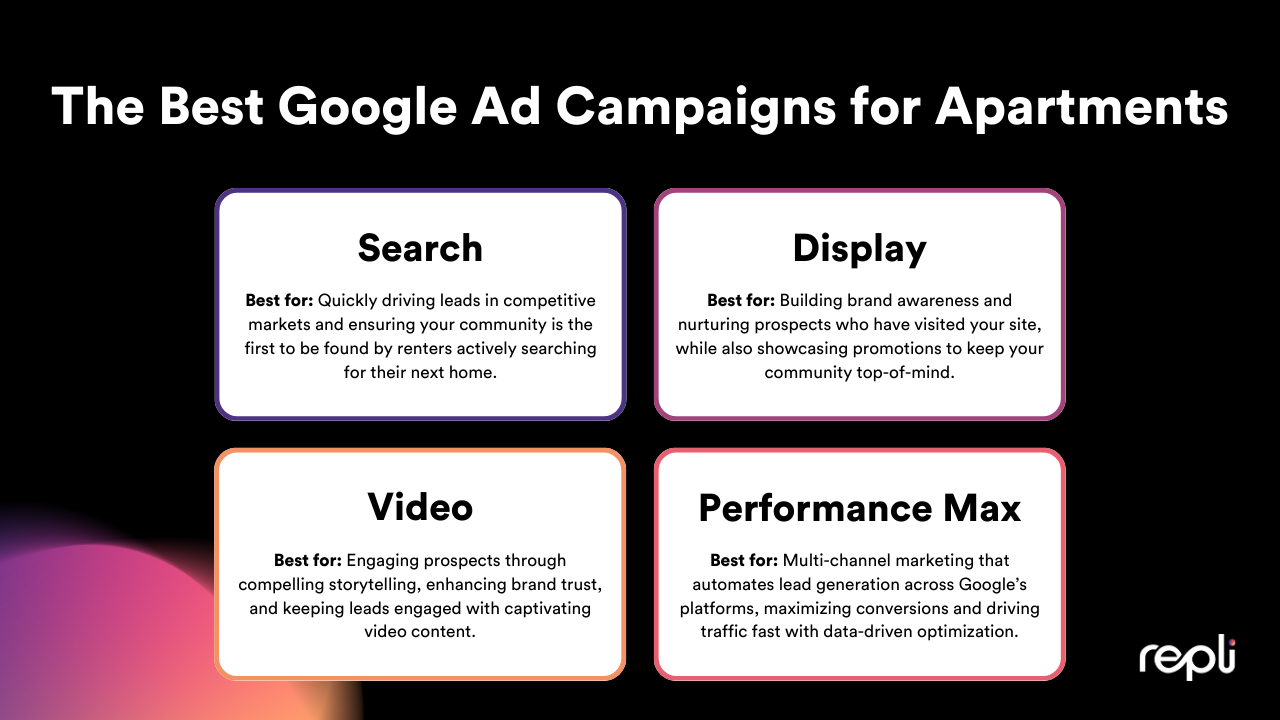
1. Search Campaigns: The Leasing Powerhouse
Search campaigns are those text ads you see at the top of Google’s search results when you type in something like "apartments for rent near me." These campaigns are gold for capturing renters who are actively searching for a new place to live.

Best For:
- Driving conversions – Perfect for filling vacancies quickly.
- Competitive markets – If your competitors are running search ads, you should be too.
- Branded searches – Ensure prospects find your website, not someone else’s ad.
- Lease-Up Periods – When you need to quickly generate leads and fill vacancies.
Budget Considerations:
- Expect higher cost-per-click (CPC) since you're bidding on high-intent keywords.
- Works best when you have a moderate to high budget for optimal visibility.
- ROI is strong because clicks often turn into leads.
Expected Results:
🚀 High conversions, strong lead generation, and great for bottom-of-the-funnel prospects ready to lease.
Pro Tip:
Use highly targeted keywords like "luxury apartments in [City]" or "pet-friendly apartments near [Landmark]" to attract renters actively searching for a new home.
2. Display Campaigns: The Awareness Machine
Display ads are those visually engaging banners you see on websites, apps, and even YouTube. They’re ideal for building brand awareness and retargeting prospects who have visited your website but haven’t converted yet.

Best For:
- Brand awareness – Keep your community top-of-mind.
- Retargeting – Remind website visitors to come back and schedule a tour.
- Promotions – Show off move-in specials and limited-time offers.
Budget Considerations:
- Lower CPC than search ads, making it a budget-friendly option.
- Works well with a moderate or lower budget to sustain brand presence.
- Best when paired with search campaigns for a full-funnel strategy.
Expected Results:
👀
High impressions, low conversions (but when combined with search ads, they help nurture leads into leases).
Pro Tip:
Use high-quality images of your property, amenities, and interiors to make your ads visually appealing and engaging.
3. Performance Max: AI-Driven Leasing Automation
Performance Max campaigns use Google’s AI to serve ads across Search, Display, YouTube, Gmail, and Maps—all while optimizing in real time based on user behavior.

Best For:
- Multi-channel marketing – Get in front of renters across multiple platforms.
- Automation lovers – Let Google’s AI do the heavy lifting.
- Maximizing conversions – Great for lease-ups that need to drive traffic fast.
Budget Considerations:
- Requires a larger budget to allow Google’s AI to test and optimize.
- Ideal for communities willing to invest in data-driven automation.
- Works well alongside Search and Display for full-funnel marketing.
Expected Results:
🤖
Balanced lead generation with high efficiency, though it takes time for Google’s AI to optimize.
Pro Tip:
Use a variety of high-quality assets (images, videos, and text) so Google’s AI can test and optimize different combinations.
4. Video Campaigns: Show, Don’t Just Tell
Video ads appear on YouTube and other video-friendly Google platforms. They’re perfect for showcasing your community’s lifestyle, amenities, and resident experiences.

Best For:
- Engaging storytelling – Highlight resident testimonials or community events.
- Brand trust – Video builds stronger emotional connections than static ads.
- Retargeting – Keep prospects engaged with visually compelling content.
Budget Considerations:
- More affordable than Search ads but requires quality video production.
- Works well for mid-range budgets looking to drive engagement.
- Best when combined with Display or Performance Max.
Expected Results:
🎬
High engagement, strong brand recall, and improved conversion rates
when paired with other campaigns.
Pro Tip:
Virtual tours, floor plan walkthroughs, and amenity highlights make fantastic video ads! Keep your videos short (15-30 seconds) and include a strong call to action like “Schedule a Tour Today!”
Final Thoughts
Choosing the right Google ad campaign depends on your leasing goals, budget, and target audience. The best strategy? A mix of campaigns! Combining Search and Display or Performance Max and Video can deliver the best results and optimize your ROI.
Remember, no single campaign does it all. A well-balanced strategy ensures you capture renters at every stage—from brand awareness to final leasing decisions. Keep testing, refining, and optimizing to get the best ROI.
🚀 Need Help Choosing Your Google Campaigns?
At Repli, we specialize in advertising for multifamily communities. Connect with us today to create a Google Ads strategy that get you more leads and leases fast!

ABOUT THE AUTHOR
Siobhan is the Head of Marketing at Repli. With over 10 years of digital marketing experience, Siobhan is dedicated to pushing boundaries and disrupting the industry by sharing insights on trends, technology, and best practices to help multifamily marketers thrive. When she's not creating content, she's often traveling with her family, filming k-pop dance covers, or exploring her favorite restaurants.
Repli Apartment Marketing Blog
Subscribe to our Newsletter & Blogs
Blog Post Subscribe Form
Share Our Post!
Apartment Marketing Blog