Google's New Review Count Filter: What Every Property Manager Needs to Know Before It's Too Late
If you manage or market apartment communities, there's a Google test quietly rolling out that could reshape how renters find you — or don't find you — in local search. It's the Review Count Filter, and it has serious implications for anyone who has recently rebranded, launched a new Google Business Profile, or simply hasn't prioritized reputation management.
Here's what's happening, why it matters, and exactly how to find your market's threshold before your competitor beats you to it.
What Is Google's Review Count Filter?
Google Maps is currently testing a new filter that lets users sort and narrow search results by the number of reviews a business has. Think of the filter bubbles you already see at the top of a Maps search — "Open Now," "Top Rated" — except now there's a new one: Reviews.
When a renter clicks that filter, they can select thresholds like "10+," "50+," or "100+ reviews." Any business that doesn't meet the selected threshold simply disappears from results.
What makes this particularly significant is how Google sets those thresholds. It doesn't use a fixed number across every city and every industry. Instead, Google analyzes the review counts of the top-ranking properties in your specific area and your specific category, then generates a filter that reflects what "credible" looks like in your local market. In a competitive urban market, that number could be 200+. In a smaller submarket, it might be 50.
The bottom line: there is a number your community needs to hit to remain visible. And Google is now surfacing that number publicly.
Why Rebranded & New GBP Listings Are at High Risk
This is where many operators are going to get caught off guard. Rebranding is common in multifamily. Properties change names after acquisitions, renovations, or repositioning. When that happens, most teams create a new Google Business Profile under the new name — and in doing so, they effectively start from zero on reviews.
Your old listing may have had 300 reviews built over five years. Your new one has eight.
Meanwhile, the Class A community that just opened down the street has been running a review generation campaign since day one and already has 150. And the value-add property that never rebranded has quietly accumulated 400 reviews over the last decade.
When a prospective renter opens Google Maps, searches "apartments near me," and filters by review count, your brand-new GBP with perfect five-star reviews — but only eight of them — doesn't make the cut. You are invisible. Not because your product is worse. Not because your rating is lower. Simply because you haven't had time to build volume.
This is the risk. And it's one that catches operators completely off-guard because nobody thinks about review volume as a lagging consequence of a rebrand.
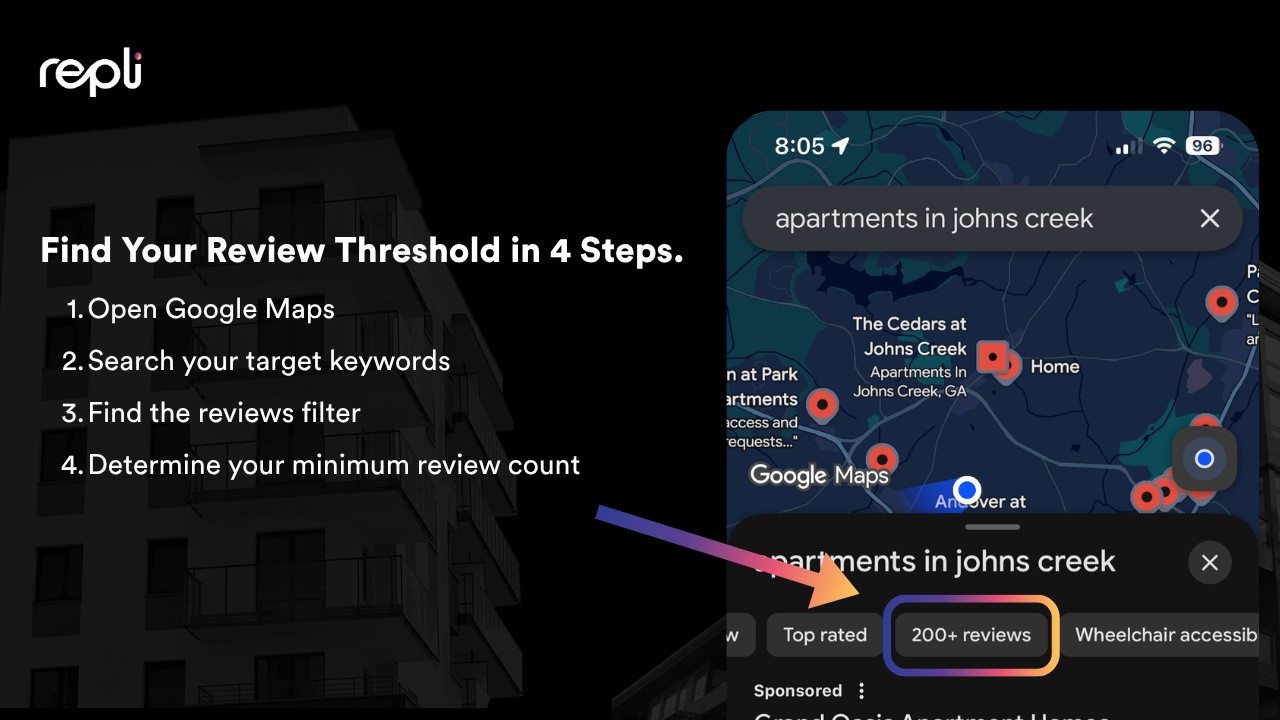
How to Find Your Market's Exact Threshold (4 Steps)
Stop guessing. Google is literally showing you the number. Here's how to find it.
Step 1: Open Google Maps directly Do not use regular Google Search. Go to maps.google.com or open the Google Maps app. This is important — the filter carousel only appears in the Maps interface, not standard search results.
Step 2: Search your primary leasing keyword Type in the exact keyword your prospective residents use to find you. For most communities this looks like "apartments in [your submarket]" or "apartments near [landmark/neighborhood]." Use the keyword that reflects how real renters search.
Step 3: Find the Reviews filter in the carousel Look at the row of filter bubbles that appears directly beneath the search bar. Scroll through them and look for the "Reviews" dropdown. This is the new filter Google is currently testing. (Note: as this is still in a testing phase, it may not be visible in every market yet — but it is rolling out broadly.)
Step 4: Read your threshold Click the Reviews filter. Google will display a set of options — typically something like "10+," "25+," "50+," "100+." The highest number shown is your market's trust threshold. That is the minimum review count a community needs to be considered competitive in your submarket. That is your target.
Write it down. Now ask yourself honestly: does your community meet it?
The Bigger Picture: Reputation Is Now a Local SEO Asset
This filter is a signal, not an outlier. It reflects a broader shift in how Google is treating review data — not just as social proof for consumers, but as a ranking and visibility signal in local search.
Volume, rating, and review velocity (how consistently new reviews are coming in) are all factors. A community with 500 reviews but nothing posted in two years sends a different signal than one with 150 reviews and a steady stream of fresh responses.
If you don't have a structured reputation management system built into your leasing and resident experience process, this is the moment to build one. That means:
- A consistent ask cadence after move-in and key service moments
- Staff training on when and how to request reviews
- A response strategy for every review — positive and negative
- Monthly tracking of your review count, rating, and velocity against your top three competitors
Your review profile is no longer just a trust signal for prospects. It is infrastructure. It determines whether you show up at all.
The Question You Need to Answer Today
Open Google Maps. Search your market. Find the filter. What's the threshold?
Now look at your current review count.
If there's a gap, you have a clearly defined goal and a timeline to close it. That's actually a good thing — it means the path forward is measurable.
If you're not sure where to start with building a reputation management system for your portfolio, that's the conversation worth having before this filter becomes standard across every market.
Because once it does, the communities that built their review volume early won't just have an edge. They'll have a moat.
Repli Apartment Marketing Blog
Subscribe to our Newsletter & Blogs
Blog Post Subscribe Form
Share Our Post!
Apartment Marketing Blog